Sometimes a single text face can say more than an entire sentence. Imagine your friend sending you an unbelievable message. You could reply with “Really?” or simply paste ( ͡° ͜ʖ ͡°). The second response has a completely different personality.
That's why Lenny faces are still fun to use. They can make a boring message funny, turn an awkward moment into a joke, or express a reaction that ordinary words don't quite capture.
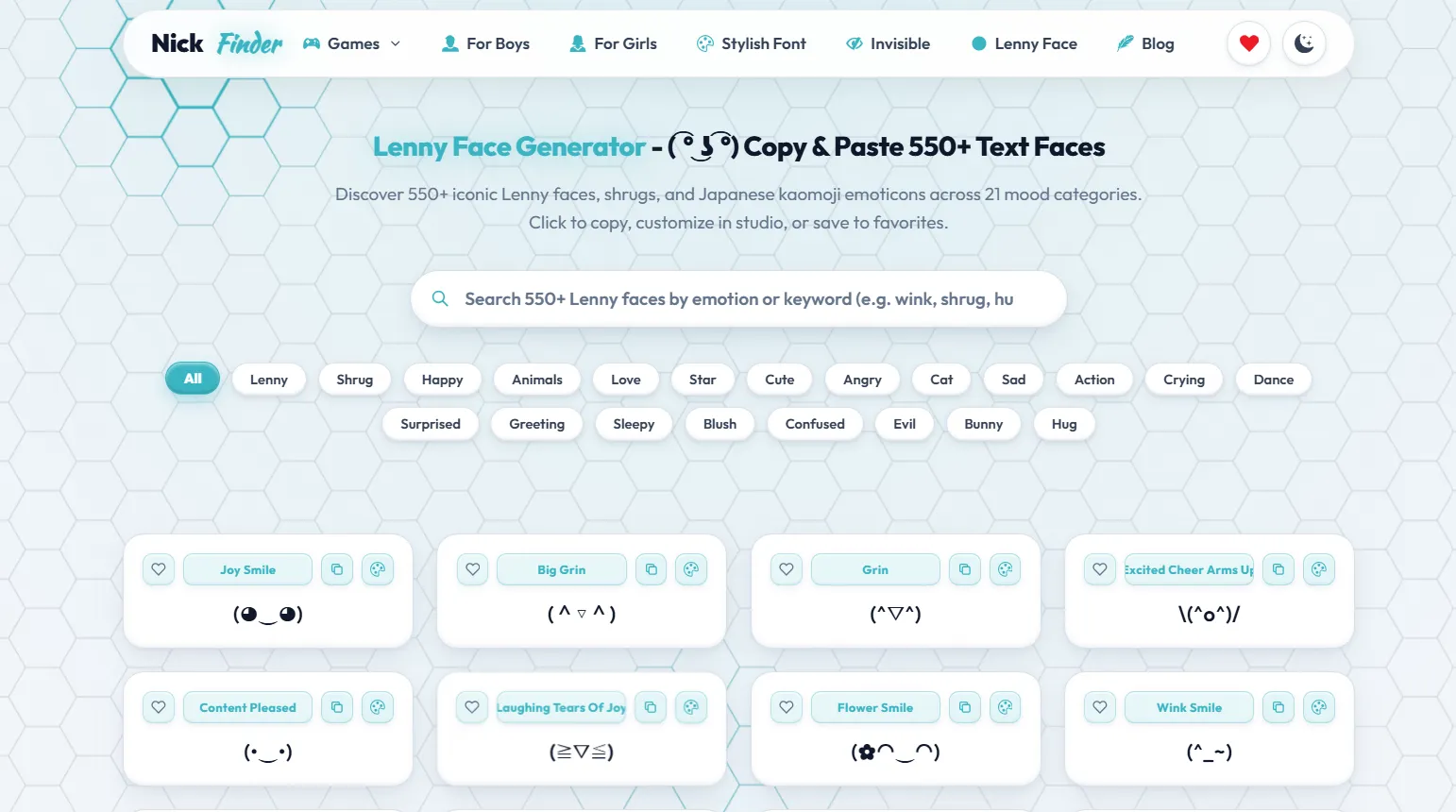
Our Lenny Face Generator brings together more than 550 Lenny faces, text faces, and kaomoji in one searchable collection. You can explore 21 categories, copy your favourite expressions, customize them in the studio, and save the ones you use most often.
Whether you need a funny Lenny face for Discord, a cute text face for your Instagram bio, or a shrug emoticon for a group chat, you can find an expression without trying to build it character by character.
What Is a Lenny Face?
A Lenny face is an expressive face created using text characters rather than a picture. The most recognizable example is:
( ͡° ͜ʖ ͡°)
Its raised eyebrows, unusual eyes, and smirking mouth give it a mischievous expression. People often use it when they're joking, being sarcastic, or suggesting that there's more to a message than they're saying.
You might also hear people call it the Le Lenny Face.
The interesting part is that the face isn't an image. It's a sequence of Unicode characters arranged to resemble an expression. You can select it, copy it, and paste it into text fields that support those characters.
Over time, people have created many variations using different eyes, mouths, arms, and surrounding symbols. The result is a whole collection of text-based reactions, from cheerful smiles to confused looks and dramatic shrugs.
Explore 550+ Text Faces Across 21 Categories
Finding the right expression becomes difficult when hundreds of faces appear in one long list. That's why our generator organizes its collection into 21 categories.
The categories help you browse by emotion, reaction, or character type instead of searching through every face manually.
| Category | What you'll find |
|---|---|
| Lenny | Classic faces and mischievous expressions |
| Shrug | Uncertainty, indifference, and “I don't know” reactions |
| Happy | Smiling, laughing, and cheerful faces |
| Animals | Playful animal-inspired text faces |
| Love | Affectionate and heart-themed expressions |
| Star | Sparkling and star-decorated faces |
| Cute | Friendly and adorable reactions |
| Angry | Frustrated or annoyed expressions |
| Cat | Kitty faces and cat-like expressions |
| Sad | Unhappy and disappointed reactions |
| Action | Movement and dramatic gestures |
| Crying | Tearful and emotional faces |
| Dance | Dancing and celebration expressions |
| Surprised | Shocked or amazed reactions |
| Greeting | Hello, waving, and welcoming faces |
| Sleepy | Tired and sleepy expressions |
| Blush | Shy, embarrassed, and bashful faces |
| Confused | Puzzled or uncertain reactions |
| Evil | Mischievous and villain-like expressions |
| Bunny | Rabbit-inspired text faces |
| Hug | Warm and affectionate gestures |
Select All to explore the entire collection, or choose a category to narrow down the results.
You don't need to know the name of a particular face. Start with the mood you're trying to express.
How to Copy and Paste a Lenny Face
The generator is designed to make copying text faces simple, even when a face contains unusual Unicode characters.
Here's how to use it:
- Browse the collection. Scroll through the available Lenny faces and their names.
- Choose a category. Select Happy, Shrug, Cat, Love, or another category if you want a specific expression.
- Search for a face. Enter a keyword such as wink, crying, or hug to find relevant results.
- Copy your favourite. Click or tap the copy icon on the face card.
- Paste it into your message. Open the app or text field where you want to use it and paste the copied face.
On Windows, you can usually paste with Ctrl + V. On a Mac, use Command + V. On a phone, press and hold inside a supported text field and choose Paste.
Each face has its own card, making it easy to identify the expression before copying.
If the first face doesn't quite match your mood, explore a few more. A small change in the eyes or mouth can completely change the tone.
Classic Lenny Faces for Funny Conversations
The original Lenny face is popular because it can mean different things depending on the conversation.
For example:
You: ( ͡° ͜ʖ ͡°)
That face communicates playful suspicion without needing a long response.
A classic Lenny expression can also work after a clever joke, a surprising announcement, or an obvious hint.
Some people prefer a straightforward version, while others like faces with changed eyes, extra arms, or exaggerated expressions.
The Lenny category is a good starting point when you want that familiar smirk but don't want to keep pasting the exact same face.
Happy and Cute Text Faces
Not every conversation calls for sarcasm. Sometimes you just want a smile that feels more personal than a standard emoji.
Happy text faces are useful when someone shares good news, makes you laugh, or sends a friendly greeting.
Examples of cheerful text-face styles include:
- (^▽^)
- (≧▽≦)
- (◕‿◕)
- ヽ(•‿•)ノ
Cute text faces have a slightly different appeal. They often use softer expressions, rounded eyes, or small decorative details.
They work well in friendly conversations, profile descriptions, and messages where you want to sound approachable.
You can browse the Happy and Cute categories separately. One might give you an excited grin, while the other offers a gentler expression.
Love, Blushing, and Hug Text Faces
A simple heart emoji is useful, but a full text face can make an affectionate message feel more expressive.
Love kaomoji may combine smiling eyes with hearts or other symbols. Blushing faces can communicate shyness, embarrassment, or a sweet reaction to a compliment.
For example:
(。♥‿♥。)
A hugging text face can communicate encouragement or affection:
(づ。◕‿‿◕。)づ
These expressions are useful when congratulating someone, thanking a close friend, or sending a supportive message.
The generator has separate Love, Blush, and Hug categories, so you can find a reaction that fits the situation.
A shy smile and an enthusiastic virtual hug don't communicate exactly the same thing. Having different options makes conversations feel less repetitive.
Shrug, Confused, and Surprised Faces
Some messages leave you without a good answer.
Maybe your friend has made a strange decision. Perhaps you've received an unexpected question, or nobody in your group knows what's happening.
That's where a shrug face comes in.
¯\_(ツ)_/¯
This familiar text shrug can mean “I don't know,” “What can you do?” or “I'm not worried about it.”
For something more surprised, you might prefer:
(⊙_☉)
Confused faces are useful when you need clarification without writing a whole explanation.
The Shrug, Confused, and Surprised categories let you choose between uncertainty, disbelief, and genuine amazement.
They're especially handy in fast-moving group chats, where a quick reaction feels more natural than typing several sentences.
Sad, Crying, Angry, and Evil Expressions
Text faces aren't limited to positive emotions. They can also express disappointment, frustration, or exaggerated outrage.
A sad face might suit a disappointing result or a missed opportunity. A crying face can communicate genuine sadness, but friends also use dramatic crying expressions when something is ridiculously funny.
For example:
(╥﹏╥)
Angry kaomoji can convey frustration:
(ಠ_ಠ)
The Evil category takes a different approach, offering mischievous expressions that can suit teasing, fictional villain jokes, or playful conversations.
The meaning depends on the situation. An angry face after losing a game may be a harmless joke, while the same reaction in a serious conversation could feel unfriendly.
Choose an expression that matches both your mood and the person receiving it.
Cat, Bunny, and Animal Text Faces
Animal-inspired text faces have their own charm. A few carefully arranged characters can create ears, eyes, whiskers, or a tiny animal expression.
One familiar example is the cat face:
(=^・ω・^=)
Animal kaomoji are useful for pet lovers, cute messages, and playful online identities.
Our collection includes Cat, Bunny, and broader Animals categories, giving you different ways to browse.
A cat face might suit a playful response, while a bunny expression can add a softer touch to a message. Other animal-themed faces can be useful when chatting with friends who love pets.
You can also pair an animal face with a short caption to give it more personality.
Action, Dancing, Greeting, and Sleepy Faces
Some text faces express an action rather than a simple emotion.
A waving face can greet a friend. A dancing kaomoji can celebrate good news. A sleepy face can suggest that you're ready to log off for the night.
For example, a dancing expression might look like:
ヽ(•‿•)ノ
An action face can even resemble a dramatic gesture, such as the well-known table-flip emoticon:
(╯°□°)╯︵ ┻━┻
The Action, Dance, Greeting, and Sleepy categories are especially useful when you want your reaction to feel animated without sending a GIF.
You can also explore the Star category when you want something with a little extra sparkle.
Search Lenny Faces by Emotion or Keyword
Knowing how you feel is often easier than remembering the exact characters in a text face.
Our search feature helps with that.
Instead of manually scrolling through hundreds of expressions, enter a word related to what you need.
For example, try searching for happy, wink, shrug, cat, sleepy, love, or crying.
The search is designed around face names and relevant keywords, making it useful when you remember the mood but not the appearance.
You can also browse categories when you're not sure what to search for.
This is particularly helpful if you use text faces regularly and want a different reaction instead of repeating the same three favourites.
Customize Your Own Lenny Face
Sometimes you find a face that's almost perfect, but you'd like to change its appearance.
That's where the customization studio comes in.
Each face card provides a customization option, allowing you to open a selected expression in the studio and work on your own version.
You can begin with an existing face instead of trying to recreate every unusual character from scratch.
Customizing a text face is useful when you want a particular expression for a personal message, a group-chat running joke, or an online profile.
The smallest change can make a difference. A different expression or decorative detail can turn an ordinary reaction into something more personal.
Once you're happy with the result, use the available copy option to take the finished text wherever you need it.
Save Your Favourite Text Faces
Everyone eventually finds a few reactions they keep using.
Maybe you have one Lenny face for sarcasm, one cheerful expression for saying hello, and one dramatic crying face for funny moments.
Rather than searching for those expressions repeatedly, use the heart icon on a face card to add it to your favorites.
The favorites feature provides a convenient place to return to the faces you like.
This is useful if you frequently switch between different chats or want to keep a consistent set of reactions.
You can still explore the full collection whenever you want something new.
Lenny Faces, Kaomoji, and Emoji: What's the Difference?
These terms are related, but they're not exactly the same.
An emoji is usually a pictographic character, such as 😀 or 😭. Depending on the device, it may appear as a colourful image-like symbol.
A kaomoji is a text-based expression built using characters. Japanese-style examples often face forward, such as (^_^), instead of appearing sideways like :-).
The classic Lenny face is also a text-based expression, made from multiple Unicode characters.
People sometimes search for Lenny face emoji, Lenny face ASCII, or Japanese text emoji when they actually want copyable text faces.
Technically, many detailed Lenny faces and kaomoji use characters beyond basic ASCII.
That distinction matters when copying them. You're copying text, not downloading a sticker or image. However, the receiving app still needs to support the characters for the expression to display correctly.
Where Can You Use Lenny Faces?
There are plenty of places where text faces can make a message more expressive.
- Discord: Add a funny reaction to a server conversation, use a kaomoji in a message, or try a suitable short face in a supported profile field.
- Instagram: Add cute text faces to captions, comments, or a bio where the characters are accepted.
- WhatsApp and Telegram: Send happy, sad, confused, or hugging faces as part of normal messages.
- Reddit and online forums: Use a shrug or classic Lenny face when a discussion calls for a quick, playful reaction.
- Gaming chats: A short face can be a fun way to celebrate a win or react to an unexpected moment, provided the game supports the characters in Free Fire, PUBG, or Roblox.
- Personal notes and creative writing: Text faces can also add personality to informal notes, character conversations, and fictional chat screenshots.
Not every platform supports every Unicode character in every field. Messaging areas generally offer more flexibility than restricted account usernames.
Why Does a Lenny Face Sometimes Look Different?
You may copy a face that looks perfectly aligned on our website, then discover that its eyes or mouth appear slightly different elsewhere.
This happens because text characters are rendered using the fonts and text-handling systems available on the receiving device or application.
Some symbols may sit higher or lower than expected. Others may display as empty boxes when the required character isn't supported.
If that happens, try a simpler face with fewer special characters.
It's also worth checking whether the destination accepts Unicode text. Some games and account-name fields have restrictions that ordinary messaging apps don't.
Copying the face successfully doesn't guarantee it will look identical on every screen.
Tips for Choosing the Right Text Face
A good text face should make your message easier to understand, not more confusing.
For a quick joke, the classic Lenny face often works. For congratulations, choose something cheerful. If a friend is upset, a gentle hug may feel more appropriate than a sarcastic smirk.
Consider the tone of the conversation before pasting anything.
You can also keep your favourites short. Very elaborate expressions may look impressive, but compact faces are usually easier to read in a busy chat.
Most importantly, use them naturally. You don't need to place a face at the end of every sentence.
Frequently Asked Questions
Is the Lenny Face Generator free to use?
You can browse the collection and use its copy feature directly on the page. Explore the customization and favorites options through their corresponding controls.
How many Lenny faces are available?
The collection currently includes 550+ text faces, organized into 21 categories, including Lenny, Shrug, Happy, Love, Cat, Crying, Angry, Dance, and more.
How do I copy the original Lenny face?
Find ( ͡° ͜ʖ ͡°) in the Lenny category or use search. Click its copy icon, then paste it into a supported text field.
Can I create a custom Lenny face?
Yes. Use the customization option on a face card to open it in the studio and create a personalized variation.
How do I find a crying or angry Lenny face?
Select the Crying or Angry category. You can also search by emotion to find related expressions.
Can I use Lenny faces on mobile?
Yes. You can browse and copy text faces on a phone, then paste them into supported apps. Display and character support may vary.
Can I use a Lenny face in a gaming username?
That depends on the game. Some allow Unicode symbols, while others restrict special characters. Test the complete face before confirming a username change.
Are Lenny faces the same as Japanese kaomoji?
Both use arranged text characters to create expressions. Lenny faces are commonly grouped with kaomoji, although the term kaomoji covers a much wider variety of faces and gestures.
Why is my copied face showing boxes?
The device or app may not support one or more characters. Try a simpler face or use a different supported text field.
Can I save faces to use again?
Use the heart icon on face cards to save expressions to your favorites and revisit the ones you enjoy.
Find a Face That Matches the Moment
A good reaction doesn't need a long explanation. Sometimes a smile, a shrug, or a mischievous expression says exactly what you mean.
Explore the 550+ Lenny faces, search through the 21 categories, customize your favourite expressions, and copy the ones that fit your conversations.
The next time you can't find the right words, you might find the right face instead.