NickFinder – Stylish Name Generator & Fancy Text Generator
Your name doesn't have to look the same everywhere. A few different letters, a crown, or a pair of wings can give even the simplest nickname a completely new look.
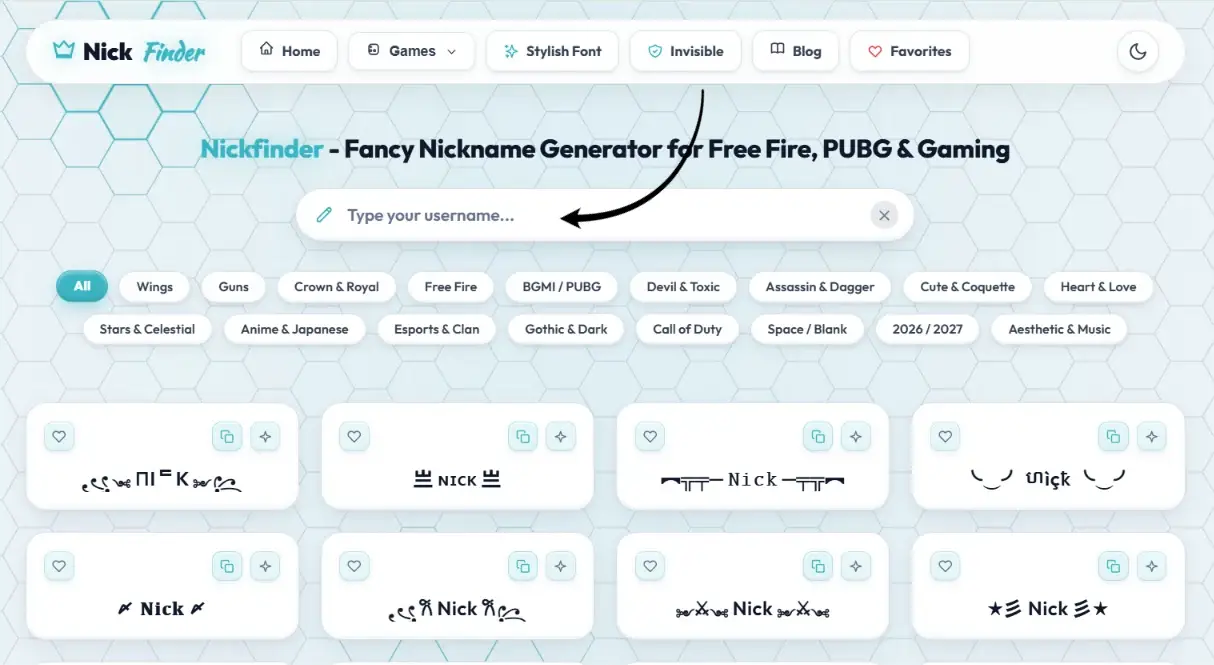
NickFinder is a free stylish name generator that lets you create and copy fancy names in seconds. Type your name once, and you'll see over 100 different styles, including gothic letters, cursive writing, small caps, gaming symbols, hearts, stars, and decorative designs.
Looking for a Free Fire stylish name? Want something different for BGMI or PUBG? We also offer dedicated collections: explore 6,000+ handpicked Nicknames for Boys (featuring attitude, anime, and esports clan names), browse 6,000+ Nicknames for Girls (featuring cute kawaii, aesthetic coquette, and royal queen styles), or create squad handles with our Guild Name Generator.
You can also use NickFinder as a cool text generator for messages, social media bios, captions, and display names. Choose a style, copy it, and paste it wherever that type of text is supported.
How to Use the Nickname Generator
You don't need to know anything about fonts or symbols to make a stylish nickname.
Step 1: Enter your name
Type your name, gaming ID, clan tag, or any word into the text box. The generator automatically creates different versions of what you've entered.
Step 2: Find a style you like
Browse through the designs or explore categories such as Angel Wings, Crown & Royal, Gothic & Dark, Cute & Coquette, and Snipers & Guns. Some styles change the letters themselves. Others add symbols around your name. You can compare them without entering your name again.
Step 3: Copy your nickname
Click or tap a design to copy it to your clipboard. If you want to change something, use the Edit button to open the design in Studio and add or remove symbols.
Step 4: Paste it into your game or profile
Open Free Fire, BGMI, PUBG Mobile, Instagram, Discord, or whichever app you're using. Paste your nickname into the appropriate field and check how it looks before saving.
A quick tip: If you're making a gaming name, look at the character-limit indicator before copying. Fancy letters and decorations don't always count the way you expect. If you need clean blank spacing, try our Invisible Space tool.
Free Fire Stylish Name Generator
A good gaming nickname is one your teammates can recognise immediately. It doesn't need ten symbols or an impossible-to-read font.
If you're looking for a stylish name for Free Fire with symbols, start with a short word you already like. Shadow, Ghost, Rocky, Sultan, Hunter, and Venom are all easy to work with.
Here are a few Free Fire nickname ideas:
- ꧁Shadow꧂
- ★RAVEN★
- ♛Sultan♛
- 『GHOST』
- 亗HUNTER亗
- ᴅᴀʀᴋ々ᴋɪɴɢ
You can copy these examples or type your own name to get a different result.
The Wings and Crown categories work well if you want something decorative. Gothic & Dark and Devil & Toxic are worth trying if you prefer a more aggressive look.
How to Make a Free Fire Name Style That Fits
Garena Free Fire has restrictions on nickname length and supported characters. A design might look short on this page but still be rejected when you paste it into the game.
That's because some decorative symbols consist of multiple Unicode characters.
Free Fire players commonly refer to a 12-character nickname limit, but you should check the limit currently enforced by your game rather than relying on a number alone.
Try to keep your actual name short, especially if you're adding a guild tag or clan tag.
For example, using a two- or three-letter clan tag leaves more room for your player name and decoration.
If you're changing an existing name in Garena Free Fire, you may need a rename card or diamonds. Test the spelling, symbols, and spacing carefully before confirming the change.
Free Fire Name Style Hindi
Want a Free Fire name style Hindi players will instantly recognise?
Try using a Hindi word written in English letters, such as Baadshah, Shikari, Toofan, Sher, Nawab, or Maharaja.
Then experiment with different styles:
- ★Baadshah★
- 『SHIKARI』
- ♛Nawab♛
- 亗TOOFAN亗
Writing Hindi-inspired names in Roman letters can be useful when a particular game doesn't accept the Devanagari characters or decorative combinations you want.
You can also mix a familiar Hindi word with a simple English clan tag. Just keep the final result readable.
PUBG Stylish Name Generator
PUBG Mobile names often look better with a little less decoration. A short clan tag, a strong player name, and one small symbol can make a clean combination.
If you're creating a PUBG stylish name, think about where other players will see it. Your nickname appears in places like the lobby, team lists, and match results. People should be able to recognise it without having to figure out what every symbol means.
Try something like:
- 『ACE』Shadow
- ᴘʜᴀɴᴛᴏᴍ
- ★FALCON★
- 亗Rogue
- 『VIP』Storm
Small caps and gothic letters are useful when you want the text itself to look different without adding too many symbols.
If you're part of a regular squad, agree on one clan tag and keep it consistent across everyone's names.
Stylish Name for BGMI
Your BGMI name doesn't have to be completely different from your PUBG Mobile nickname. Both games have similar gaming-name styles, but you still need to follow the rules of the specific game you're playing.
For a stylish name for BGMI, try using your normal player name with a short prefix or suffix.
If your squad uses a tag like RX, VIP, or ACE, place it before the name. This leaves the main part of your nickname easy to read.
BGMI Name Style and Character Limit
A common concern when choosing a BGMI name style is whether the design will fit in the nickname field.
Players often report a 14-character limit for BGMI, but character handling can vary, especially when special Unicode symbols are involved. Check the final name in the game.
A few useful things to remember:
- Keep your clan tag short.
- Avoid using several large symbols together.
- Try small caps or simple brackets if your name is already long.
- Check the copied design before using a Rename Card.
The Esports & Clan category is a good starting point if you're making matching names for your squad.
Call of Duty, Fortnite, Valorant, Roblox and Other Gaming Names
NickFinder isn't only for Free Fire and PUBG. You can try the same generator for other games, although not every platform accepts decorative Unicode text.
Call of Duty Mobile Stylish Names
For Call of Duty Mobile, names such as Ghost, Viper, Reaper, Falcon, and Sniper fit the game's military theme.
You can use the Call of Duty category to explore gaming-style designs and symbols.
If you're making a COD nickname, try a simple tag followed by a short name. Test the copied characters before spending anything on a name change.
Fortnite Stylish Names
A Fortnite name doesn't need to be covered in symbols to stand out.
Try something short like Nova, Drift, Storm, or Blaze. You can experiment with small caps or italic-looking letters, but Epic Games has rules governing which characters are allowed in display names.
Also, your Fortnite display name may depend on whether you're playing through an Epic Games account or a linked console account.
Valorant Stylish Names
Valorant uses Riot IDs, which include a game name and tagline.
Riot has specific rules for both parts, so not every fancy letter or gaming symbol will work.
If you're looking for a Valorant name, choose something readable first. Then test whether any special characters you want to add are supported.
Roblox Stylish Names
Roblox usernames and display names are different.
A display name can be changed separately from your account username, but Roblox still applies character restrictions and moderation rules.
Try simple lettering or a lightly decorated nickname. Many unusual Unicode symbols won't be accepted.
Minecraft and Mobile Legends Nicknames
Minecraft Java Edition has specific restrictions on profile names, so the fancy Unicode designs on this page generally aren't suitable for a standard Java username.
They may still be useful for Minecraft community profiles or servers that support custom nicknames.
For Mobile Legends, you can experiment with gaming symbols, crowns, stars, and different letter styles. As always, the game's own nickname field determines what will work.
Instagram Bio Font Generator
Sometimes all you need is a different font for your Instagram bio.
You might want your name in cursive, a bold-looking line under your profile photo, or a small heart next to a short quote.
NickFinder makes it easy to experiment without switching between several font tools.
Enter the text you want to use, choose a style, and copy it. You can try the result in your Instagram bio, display name, or captions.
For an Instagram bio font, readability matters more than the number of decorations.
A single styled line can look nice. An entire paragraph written in unusual Unicode letters can be difficult to read, especially for people using screen readers.
Instagram Name Style Ideas
If you're looking for an Instagram name style, start by deciding what kind of profile you're creating.
For a personal account, cursive or small caps can give your name a subtle change.
For a gaming page, gothic letters or a single decorative symbol might fit better.
For an aesthetic account, try thin-looking text, stars, hearts, or a simple lowercase design.
The Cursive, Cute & Coquette, Stars & Celestial, and Aesthetic & Music categories give you different looks to compare.
Stylish Name for Instagram: Username vs Display Name
There's an important difference between your Instagram username and your display name.
Your username is the @handle people type to find or tag you. Instagram limits usernames to ordinary letters, numbers, periods, and underscores.
Decorative Unicode letters generally won't work in that field.
Your display name is more flexible, so that's where you can try a stylish name for Instagram.
You can also add fancy text to Instagram bio lines and captions, provided the app supports the chosen characters.
For most profiles, keeping your username simple and using a stylish display name is a practical combination.
TikTok and WhatsApp Fancy Text
TikTok also separates your username from the nickname shown on your profile.
Your @username follows specific character rules, while your display nickname offers more flexibility.
If you create videos about gaming, music, anime, or fashion, you can choose a text style that matches your content.
Try a name in cursive, small caps, or gothic letters, then check how it looks on your TikTok profile.
WhatsApp Fancy Text for Status and Messages
WhatsApp already supports basic text formatting, including bold, italic, and strikethrough.
But if you want bubble letters, gothic text, cursive characters, or decorative symbols, a Unicode text generator gives you more options.
You can use WhatsApp fancy text in messages, status updates, group names, and About text wherever the characters are supported.
For example, you could style a short birthday message, add a heart to a group name, or use small caps for your About section.
Don't overdo it, though. Regular text is still easier to read in longer conversations.
Discord Nickname and Fancy Display Names
Discord is another place where a stylish nickname can be useful.
You might want a matching name for your gaming squad, a roleplay character, or a community server.
Discord display names support a wider selection of characters than usernames, including many symbols and emojis. Server nicknames also let you use a different name within a community when permissions allow it.
Try a short name with a single symbol or a clean font style. If your friends can still recognise your name at a glance, you've probably found a good balance.
Attitude Name Style Ideas
If you prefer names with a darker or more competitive feel, start with words that already sound strong.
Shadow, Venom, Rogue, Phantom, Reaper, Wolf, and Dark King are popular kinds of gaming-name ideas.
An attitude name style usually combines a short word with bold-looking letters, gothic characters, or symbols such as crowns and daggers.
You can try a design like ★Rogue★ or 亗PHANTOM亗, then adjust it in Studio.
Avoid using too many unrelated symbols. A crown, a gun, two wings, and several stars around one short word usually make the actual name harder to see.
Stylish Name for Boys
There isn't one particular font that makes a nickname suitable for boys. It depends on the look you're going for.
If you want a strong gaming name, try Titan, Raider, Falcon, Hunter, or Storm.
If you prefer something simple, your real name in small caps or bold-looking Unicode letters can work just as well.
When searching for a stylish name for boys, experiment with different categories rather than choosing the first design that looks aggressive.
A clean name is often more memorable than a complicated one.
Stylish Name for Girls
You can make a soft, cute, elegant, or dark-looking nickname with the same generator.
Luna, Angel, Misty, Rose, Cherry, and Starlight are useful starting points for cursive and decorative styles.
If you're looking for a stylish name for girls, try the Heart & Love, Cute & Coquette, or Stars & Celestial categories.
You can also use gothic letters, gaming symbols, or royal designs. There's no reason to limit yourself to hearts and flowers.
Choose a style that fits the name and where you plan to use it.
Cute Nickname Ideas
Cute nicknames work well when they're short, easy to pronounce, and a little playful.
Think of names such as Mochi, Bunny, Coco, Peach, Bubbles, or Cookie.
Some cute nickname ideas look best with a single heart or flower. Others work well in cursive letters.
For example:
- ♡Mochi♡
- ✿Coco✿
- 𝓛𝓾𝓷𝓪
- ★Peach★
You can try these for Instagram display names, Discord nicknames, and other profiles.
If you're making a name for a game, check whether the symbols are accepted before saving it.
Aesthetic Name Generator
Not everyone wants wings, weapons, or large decorative borders around their name.
If you prefer a minimal look, try an aesthetic name generator style with small caps, light-looking letters, stars, or carefully placed spacing.
Words like Moon, Echo, Dream, Nova, and Starlight often work well with these designs.
The Aesthetic & Music, Anime & Japanese, and Stars & Celestial categories are good places to experiment.
A simple symbol at the beginning or end of a word is usually enough.
You can also mix a plain name with one styled word if you're creating a social media bio.
Cool Symbols, Lenny Faces and Lamao Faces
Fancy letters aren't the only way to change how a name looks.
You can use cool symbols such as stars, hearts, arrows, crowns, wings, and other decorative characters around ordinary text.
For example, ★Shadow★ keeps the name completely readable while adding a small amount of decoration.
Text faces are another option.
Lenny faces, such as ( ͡° ͜ʖ ͡°), use punctuation and Unicode characters to create expressions that you can paste into messages or profiles. Explore hundreds of Japanese kaomoji on our Lenny Face Generator.
You may also see people searching for Lamao faces or LMAO-style text faces. These are generally used for funny, surprised, or playful reactions in chats.
Some examples are:
- ( ͡° ͜ʖ ͡°)
- ¯\_(ツ)_/¯
- (╯°□°)╯︵ ┻━┻
- (。◕‿◕。)
Remember that these expressions can be quite long, so they're not always suitable for gaming nicknames with tight character limits.
Font Changer, Italic Font Generator and Gothic Font Generator
You might be wondering why fancy letters still look different after you copy them into another app.
A typical font changer on a website doesn't install a new font on your phone. Instead, it replaces ordinary letters with Unicode characters that resemble different lettering styles.
For example, a regular word can become bold-looking text, cursive writing, small caps, or gothic letters.
An italic font generator is useful when you want a softer, slanted appearance for a name, caption, or short bio.
A gothic font generator creates a more traditional blackletter look, often used for dark-themed names and gaming profiles.
If you want bubble letters, boxed characters, upside-down text, or other variations, you can explore those styles on the same page.
NickFinder works as a fancy text converter because it changes the characters you enter into different Unicode-based styles.
That also means the result isn't guaranteed to appear identically on every device. Apps and operating systems can render Unicode characters differently.
Why Some Fancy Text Doesn't Work
You've probably seen it happen: a nickname looks perfect in the generator, but the game refuses it or displays empty squares.
There are several possible reasons.
- Unsupported characters: Some games and apps accept only certain letters and symbols. Try a simpler design if your chosen name is rejected.
- Missing glyphs: If you see squares or question marks, the app or device may not have the characters needed to display your text properly.
- Nickname length: Decorative characters can make a name longer than it appears. Remove unnecessary symbols or shorten the original word.
- Invisible characters: Some platforms strip or block invisible spaces, even when they look fine in the generator.
- Username restrictions: A platform may allow special characters in display names or messages but not in usernames.
If something doesn't work, try another style with the same word. You don't have to abandon the name completely.
Frequently Asked Questions
What is NickFinder?
NickFinder is a free nickname generator that creates stylish names, decorative text, and symbol-based designs you can copy and paste into supported games and apps.
Is a fancy nick name generator different from a nickname generator?
Not really. People use phrases like fancy nick name generator, stylish nickname generator, and fancy text generator to describe tools that turn ordinary words into decorative text. Some focus on gaming names, while others offer more general font styles and symbols. NickFinder includes both.
Can I use NickFinder to create a Free Fire stylish name?
Yes. Enter your name, explore the gaming categories, and copy a design you like. Paste it into the game's nickname field to check whether it meets the current naming rules.
How do I create a PUBG stylish name?
Type your name into the generator and try small caps, gothic letters, or clan-tag designs. Choose something short enough to fit the game's nickname limit and test it before confirming a name change.
Can I use these stylish names in BGMI?
You can copy generated names into BGMI, but the game determines which Unicode characters and symbols are accepted. If one design is rejected, try a simpler version.
Can I add invisible spaces to my Free Fire nickname?
You can copy a blank character using the Invisible tool and try placing it between parts of your name. Whether it works depends on the game's restrictions.
Does a stylish name generator work for Instagram?
Yes, for supported fields such as your display name, bio, and captions. Decorative Unicode characters generally aren't allowed in Instagram @usernames.
What is the difference between a fancy text generator and a regular font changer?
Both terms are commonly used for tools that create decorative text. Most online fancy text tools use Unicode characters rather than changing the actual font installed on your device.
Can I use cool symbols with a normal name?
Yes. You can keep the original letters and add stars, hearts, crowns, or other decorations around them.
Does NickFinder work for Valorant, Fortnite and COD?
You can generate names for all three, but each game has its own restrictions. A character that works in one game may be rejected in another.
Is NickFinder free?
Yes. You can generate and copy the available nickname designs without signing up or paying for the tool.
Make Your Name Your Own
You don't need to start with a completely new name. Sometimes changing the lettering or adding one small symbol is enough.
Type your name, compare a few styles, and copy the one that feels right. Whether you're updating a gaming nickname or making your social media profile look a little different, you can experiment until you find something you like.